From the Tasks list, users can create and assign tasks to other staff that will be connected to the object record. Once created, tasks will appear on that staff’s AmpliFund calendar, and they will receive email reminders related to that task.
- Open an object record.
- Open the Tools tab>Tasks.
- Click the (Mark as Complete icon) next to a task name.
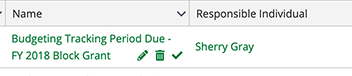
- In the confirmation pop-up window, click Mark as Complete.
Comments
2 comments
Doesn't answer how to complete the task and then mark as complete.
Erin
Hi Erin, you need to complete your task in AmpliFund, and then mark the task as complete by clicking the check icon next to the task name. I hope that helps. If you have more questions, feel free to open a ticket with our support team.
Please sign in to leave a comment.