The Organizations list shows all organizations records created in AmpliFund.
Deleted organizations can be restored. Once restored, the organization will reappear in the Organizations list.
- Open Contacts>Organizations.
- Click the (Menu icon) in the Status column.
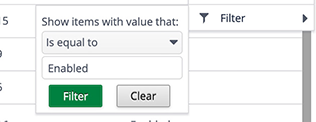
- Hover over Filter to show filter menu.

- In the filter menu, click Clear to show deleted organizations.
- Click a deleted organization name.
- Click the (Restore icon) in the Icon Bar.

- In the confirmation pop-up window, click Restore.
Comments
0 comments
Article is closed for comments.