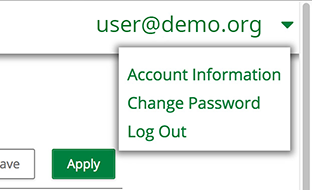
How To Change Your Password Updated September 15, 2026 17:45 Follow Click your email address on the top-right corner of any page. In the dropdown menu, select Change Password. Update the information as necessary. Click Save & Return. Related articles How To Log In to the Applicant Portal How To Add a Sub-Recipient How To Add/Edit Account Details How To Add a Milestone Measure on an Application How To Restore a Deleted Individual Comments 2 comments Sort by Date Votes Andrea Carlson January 06, 2025 23:09 My dropdown does not have the option to change my password. 0 Comment actions Permalink Morgan King January 07, 2025 14:45 Hi Andrea, We created a new support ticket to review your access further. We will send any updates/instructions on how to reset your password via the ticket. Regards, Morgan 0 Comment actions Permalink Article is closed for comments.
Comments
2 comments
My dropdown does not have the option to change my password.
Hi Andrea,
We created a new support ticket to review your access further. We will send any updates/instructions on how to reset your password via the ticket.
Regards,
Morgan
Article is closed for comments.